Services / Orders
Every order
on one board
Pickup orders from your website and sales at the counter land in the same place, with an order number that never resets. When a new order comes in, the board rings.
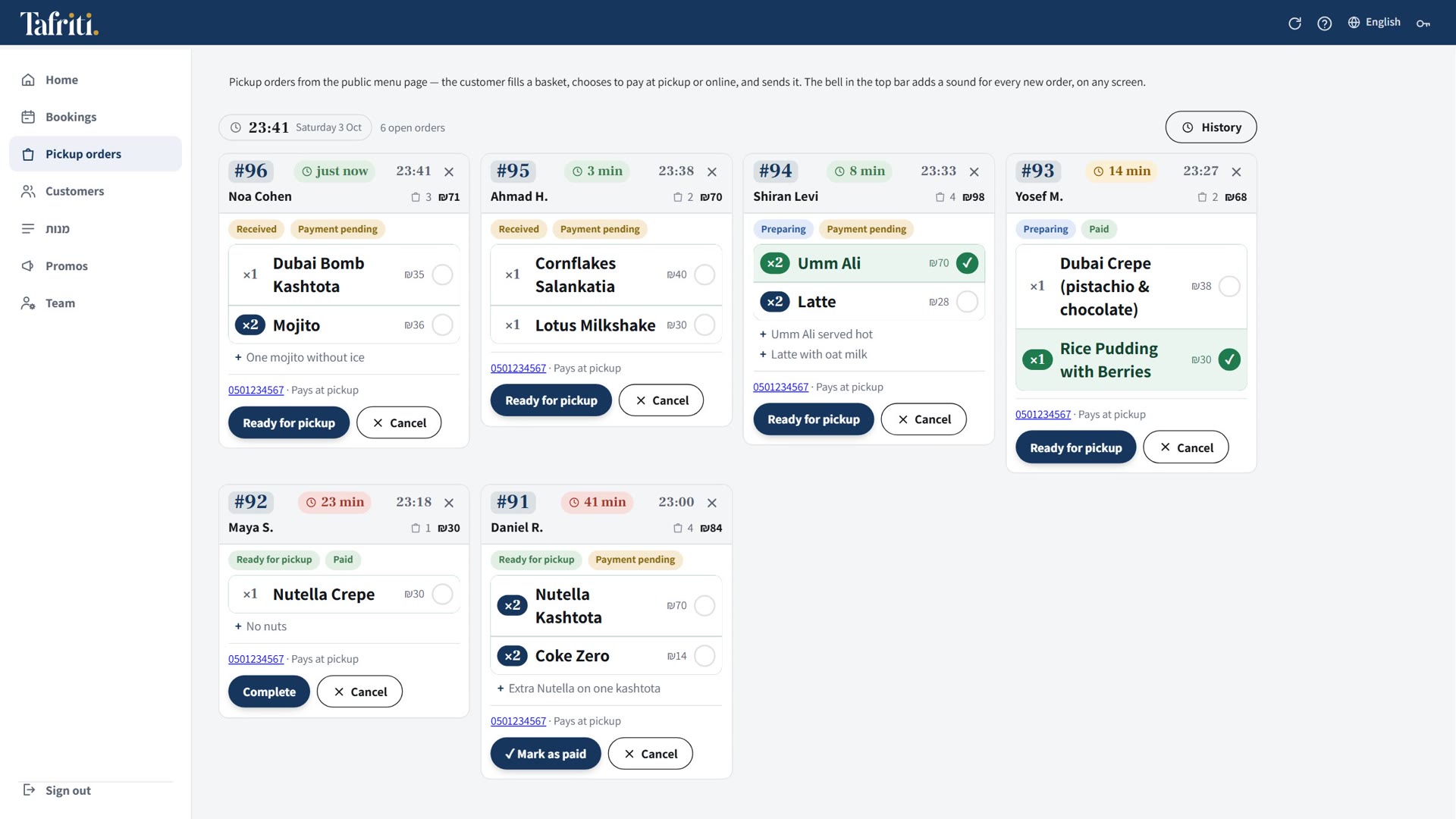
What's in Orders
Running numbers
Each business gets its own numbering that never resets. On the thank-you screen, the customer sees the number and when the order will be ready.
Approve or decline
From the board, or from a button inside the email. The customer gets an email with your answer. Don't want emails? Turn them off.
A bell
A new order rings on the board, including on the iPad standing on the counter.
Phone notifications
New orders and bookings arrive as notifications even when the browser is closed. On iPhone, once the app is added to the home screen.
Ready, item by item
Staff mark each line as it's ready, and every device updates at once.
Counter sales too
A sale opened at the POS shows up on the same board, so the kitchen sees everything in one place.
One order, start to finish
- The customer orders onlinePicks dishes and add-ons, and gets an order number and a pickup time.
- The board ringsSo does your phone, if you're away from the counter.
- You approveWith one tap on the board or in the email. The customer gets an email that the order is confirmed.
- You mark it readyLine by line, and the customer picks it up.
See it running
on your business
Leave your name and phone, tick what interests you, and we'll get back to set up 15 minutes on WhatsApp or at your place.